
DDoS Attacks Explained: What They Are, How They Work, and How to Defend Against Them

DDoS Attacks Explained: What They Are, How They Work, and How to Defend Against Them

In the physical world, blocking access to a store requires physically obstructing its entrance. In the digital realm, cybercriminals achieve the exact same effect using a Distributed Denial of Service (DDoS) attack. By flooding a target server, web application, or network infrastructure with overwhelming volumes of fake traffic, attackers render online services completely unavailable to legitimate users.

DDoS attacks are among the most prevalent cyber threats facing businesses, e-commerce platforms, and government systems today. In this comprehensive guide, we will analyze the fundamental mechanics of DDoS attacks, examine their primary classifications, and outline proven infrastructure defense strategies.


1. What Is DoS and DDoS? (The Core Difference)

To understand DDoS, it is necessary to distinguish it from a standard DoS (Denial of Service) attack:

  • DoS (Denial of Service): Originates from a single computer or IP address. A single machine sends malicious packets to exhaust target resources. Because the traffic comes from a single source, defenders can easily block the offending IP address using standard firewall rules.
  • DDoS (Distributed Denial of Service): Utilizes thousands or millions of geographically distributed compromised devices simultaneously. Because the attack traffic originates from countless legitimate-looking endpoints across the globe, distinguishing attack traffic from real user requests becomes extraordinarily difficult.
Attacker (Command & Control) Infected IoT Devices Compromised Servers Infected PCs / Laptops Target Web Server [RESOURCE EXHAUSTION]
Figure 1: Architecture of a Botnet orchestrating a Distributed Denial of Service (DDoS) attack.

2. How DDoS Attacks Work: The Role of Botnets

At the core of almost every large-scale DDoS attack lies a Botnet. A botnet is a network of internet-connected computers, smart home devices (IoT cameras, routers), or servers that have been infected with malware without their owners’ knowledge.

The attacker, often called a “botmaster,” commands this network from a centralized Command and Control (C2) server. When instructed, every compromised device (“bot” or “zombie”) broadcasts a stream of requests to the target IP address. Because each request originates from a legitimate IP address, the target server’s CPU, memory, or network bandwidth becomes completely overwhelmed trying to process the incoming flood.

3. The 3 Main Categories of DDoS Attacks

Cybersecurity analysts classify DDoS attacks into three main vectors, depending on which layer of the OSI (Open Systems Interconnection) model they target:

Attack Category OSI Layer Targeted Component Common Attack Methods
Volumetric Attacks Layer 3 / Layer 4 Network Bandwidth UDP Floods, ICMP Floods, DNS Amplification
Protocol Attacks Layer 3 / Layer 4 Firewalls, Load Balancers SYN Floods, Ping of Death, Smurf DDoS
Application Layer Attacks Layer 7 Web Applications, Databases HTTP Floods, Slowloris, Form Submissions

A. Volumetric Attacks (Bandwidth Saturation)

The primary goal is to consume all available network bandwidth connecting the target to the internet. Attackers often use DNS Amplification techniques, where small spoofed requests sent to open DNS resolvers produce massive responses directed at the victim’s IP, expanding attack traffic volume up to 50 times.

B. Protocol Attacks (Exhausting Infrastructure Resources)

These attacks focus on consuming processing resources of intermediate networking equipment, such as firewalls, routers, and load balancers. A classic example is a SYN Flood, where an attacker continuously sends initial TCP connection requests without completing the handshake, forcing the server to hold open thousands of half-open connection slots until system memory is depleted.

C. Application Layer Attacks (Layer 7)

These sophisticated attacks mimic real user behavior by submitting heavy resource-intensive requests (e.g., executing complex database search queries or fetching large PDF files over HTTP/HTTPS). Because establishing a Layer 7 connection requires completing full TCP and TLS handshakes, these attacks require less bandwidth to paralyze an unoptimized database server.

Incoming Traffic Attack + Real Users Cloud Scrubbing Network (Cloudflare / AWS Shield) ✕ Malicious Traffic Filtered ✓ Clean Traffic Allowed Protected Server 100% Uptime Maintained
Figure 2: Cloud reverse proxy scrubbing network filtering malicious volumetric traffic.

4. How to Defend Against DDoS Attacks

Effective defense against modern multi-vector DDoS attacks requires a multi-layered security strategy blending infrastructure optimization and automated traffic filtering.

1. Deploy Cloud-Based Scrubbing Services

The most effective defense against high-volume volumetric attacks is deploying a cloud reverse proxy mitigation provider (such as Cloudflare, AWS Shield, or Akamai). These services route global web traffic through vast distributed Anycast networks. Malicious flood traffic is absorbed and filtered at edge data centers (“scrubbed”) before reaching your origin server.

2. Implement Rate Limiting and Web Application Firewalls (WAF)

Configuring a Web Application Firewall (WAF) enables granular control over application-layer traffic. Rate limiting restricts the number of HTTP requests a single IP address can make within a specified timeframe, effectively neutralizing Layer 7 application floods and automated web scrapers.

3. Hide Origin Server IP Addresses

Ensure that your origin server’s direct IP address is never exposed publicly in DNS records or email headers. If attackers discover your origin IP, they can bypass cloud proxies and launch volumetric attacks directly against your server host.

4. Configure Hardware and OS Level Tuning

Tuning operating system network stack parameters helps servers withstand protocol attacks. For example, enabling SYN Cookies on Linux servers prevents memory exhaustion during SYN flood attacks without dropping legitimate connection attempts.

Key Insight: Modern DDoS mitigation relies heavily on behavioral AI models that evaluate traffic patterns in real-time, instantly issuing CAPTCHA challenges to suspicious requests while passing legitimate human users transparently.

Conclusion

DDoS attacks are an ever-evolving threat aimed at disrupting online availability and damaging brand reputation. By understanding the distinction between volumetric, protocol, and application-layer attack vectors, organizations can build robust defensive infrastructures. Partnering with cloud mitigation networks, enforcing rate limits, and hiding origin IP addresses ensures your digital services remain operational even under intense attack.
Posted on Categories Threats

Spam Explained: What It Is, How to Spot It, and How to Block It Effectively

Spam Explained: What It Is, How to Spot It, and How to Block It Effectively

In the early days of the internet, receiving an email was an exciting event. Today, digital inboxes are continuously bombarded with an overwhelming volume of unsolicited messages. Commonly referred to as spam, these unwanted electronic communications account for nearly half of all global email traffic. While much of it is merely annoying commercial advertising, a significant portion of spam poses severe security risks, including malware distribution, identity theft, and financial fraud.

Understanding what spam is, recognizing its various manifestations, and implementing modern defensive tactics are essential skills for maintaining both productivity and personal cybersecurity. This guide breaks down the mechanics of digital spam and provides actionable steps to block it effectively.


1. What Is Spam? (Definition and Origins)

In digital terminology, spam refers to Unsolicited Bulk Email (UBE) or Unsolicited Commercial Email (UCE). To qualify as spam, a communication must satisfy two primary criteria:

  • Unsolicited: The recipient did not grant explicit permission to be contacted.
  • Bulk: The exact same message is broadcast simultaneously to thousands or millions of recipients.

The term famously originated from a 1970 Monty Python comedy sketch in which actors repeatedly shouted the name of the canned meat product SPAM, drowning out all other conversation. Cybercriminals and aggressive marketers adopted the term to describe digital messages that flood inboxes and drown out legitimate communications.

Spammers gather target addresses through data breaches, automated web scraping tools (which harvest email addresses posted publicly on websites), or by purchasing massive, illicit mailing lists on dark web marketplaces.

Spammer / Botnet • Web Scraping • Leaked Lists • Bulk Mailers Millions Sent ➔ Spam Filter Shield • SPF / DKIM Checks • Blacklist Analysis • Heuristic Keyword Scan Evaluation Gate Clean Inbox Legitimate Messages Only Junk / Spam Folder Quarantined Messages
Figure 1: The architecture of automated email filtration routing incoming traffic.

2. Common Types of Spam

Spam extends far beyond unsolicited marketing newsletters. Modern spam categories include:

A. Commercial Advertisements

Mass marketing messages pushing counterfeit merchandise, dubious pharmaceuticals, unverified dietary supplements, or illegal gambling portals.

B. Phishing and Social Engineering

Deceptive emails engineered to impersonate trusted entities—such as your bank, shipping providers (FedEx, DHL), streaming platforms, or government agencies. Their goal is to trick you into clicking malicious links and surrendering login credentials or credit card details.

C. Malware and Ransomware Distribution

Messages carrying dangerous attachments (such as executable files, obfuscated PDF documents, or macro-enabled Word files) designed to infect your operating system with keyloggers or ransomware upon opening.

D. Advance-Fee Fraud (419 Scams)

Classic fraudulent schemes promising enormous sums of money in exchange for a small upfront “processing fee” or tax payment (e.g., foreign inheritance scams).

3. How to Spot and Recognize Spam Messages

While automated email filters catch the majority of unwanted mail, sophisticated phishing attacks frequently bypass technical defenses. Look out for these telltale signs when evaluating suspicious messages:

  • Mismatched Sender Domains: The display name might read “PayPal Support,” but checking the underlying email address reveals a domain like service-update@xzy-security-alert.com.
  • Artificial Sense of Urgency: Threat actors use high-pressure tactics, such as claiming “Your account will be suspended within 24 hours” or “Unauthorized transaction detected!” to induce panic and prevent logical evaluation.
  • Generic Salutations: Messages addressing you as “Dear Customer” or “Valued User” rather than using your actual name indicate mass automated broadcasting.
  • Suspicious Links and Shortened URLs: Hovering your cursor over a link without clicking reveals its actual destination address. If the target URL does not match the official organization website, it is a phishing link.
  • Poor Grammar and Spelling: Professional organizations employ proofreaders. Frequent typographical errors, awkward phrasing, or strange character encodings are clear indicators of malicious origin.
🚩 FAKE SENDER: Security Team <admin-support@verify-account-sec.net> 🚩 URGENT SUBJECT: URGENT: Your account will be closed in 12 hours! Dear Customer, We detected suspicious activity on your bank profile. Please click below to verify your identity. Verify Account Now 🚩 MALICIOUS LINK (Points to fake phishing site)
Figure 2: Deconstructing the primary red flags within a fraudulent email message.

4. How to Effectively Block and Minimize Spam

Eliminating spam entirely is practically impossible, but implementing a defense-in-depth approach will drastically reduce the volume reaching your inbox.

1. Train Your Provider’s Spam Filter

Never simply delete a spam message from your inbox. Always select the email and click “Report Spam” or “Mark as Junk.” This feeds machine learning algorithms (like Google or Microsoft spam filters), helping them recognize similar patterns and block future iterations globally.

Warning: Never click the “Unsubscribe” button inside a suspicious or malicious spam email. Spammers use fake unsubscribe links to confirm that your email address is active and actively monitored, which will result in receiving even more spam.

2. Use Email Aliases and Masking Services

Protect your real primary email address by utilizing email masking services (such as Firefox Relay, SimpleLogin, or iCloud Private Relay). When signing up for new web services, online stores, or newsletters, generate a unique alias. If an alias starts receiving spam due to a data breach, you can disable it with a single click without changing your main inbox address.

3. Hide Your Email from Public Web Pages

Automated web scraping bots constantly index web pages searching for the @ symbol. Avoid posting your plain-text email address on public forums, personal blogs, or social media. If you must post contact info, write it out (e.g., john [at] domain [dot] com) or embed it inside an image.

4. Deploy Third-Party Email Security Solutions

For custom domains or business environments, configure advanced email authentication protocols:

  • SPF (Sender Policy Framework): Specifies which mail servers are authorized to send email on behalf of your domain.
  • DKIM (DomainKeys Identified Mail): Adds a cryptographic signature to outgoing messages, proving authenticity.
  • DMARC (Domain-based Message Authentication): Instructs receiving servers on how to handle emails that fail SPF or DKIM checks.

Conclusion

Spam is far more than an annoying inconvenience—it is the primary delivery vehicle for modern cyber threats. By maintaining digital hygiene, utilizing email aliases, verifying sender authenticity, and training your email provider’s filtering algorithms, you can maintain a clean, secure, and stress-free inbox.

Posted on Categories Threats

Understanding Phishing: Mechanics, Vectors, and Preventive Strategies

Understanding Phishing: How It Works and How to Protect Yourself

In the contemporary digital threat landscape, technical defenses such as firewalls, end-to-end encryption, and multi-layered access controls have become increasingly robust. Consequently, cybercriminals rarely attempt to force their way through complex cryptographic barriers. Instead, they exploit the most accessible vulnerability in any security infrastructure: the human element. This tactic is known as phishing, and it remains the primary entry point for major data breaches, identity theft, and corporate financial fraud worldwide.

What is Phishing?

The term phishing is an adaptation of the word “fishing.” The metaphor is precise: attackers cast a digital lure—disguised as an authentic message—and wait for unsuspecting users to take the bait, surrendering sensitive information or executing unauthorized software.

At its core, phishing is a form of social engineering. It relies on psychological manipulation rather than system exploits. Attackers impersonate trusted entities—such as commercial banks, logistics providers, government agencies, streaming services, or internal corporate IT departments—to trick victims into disclosing:

  • Account Credentials: Usernames, passwords, and security answers for email, social media, or corporate portals.
  • Financial Information: Credit card numbers, CVV codes, bank account details, and PINs.
  • Personally Identifiable Information (PII): Social Security numbers, national IDs, and date of birth for identity theft.
  • Authentication Tokens: One-time passcodes (OTP), SMS verification codes, or multi-factor authentication (MFA) prompts.
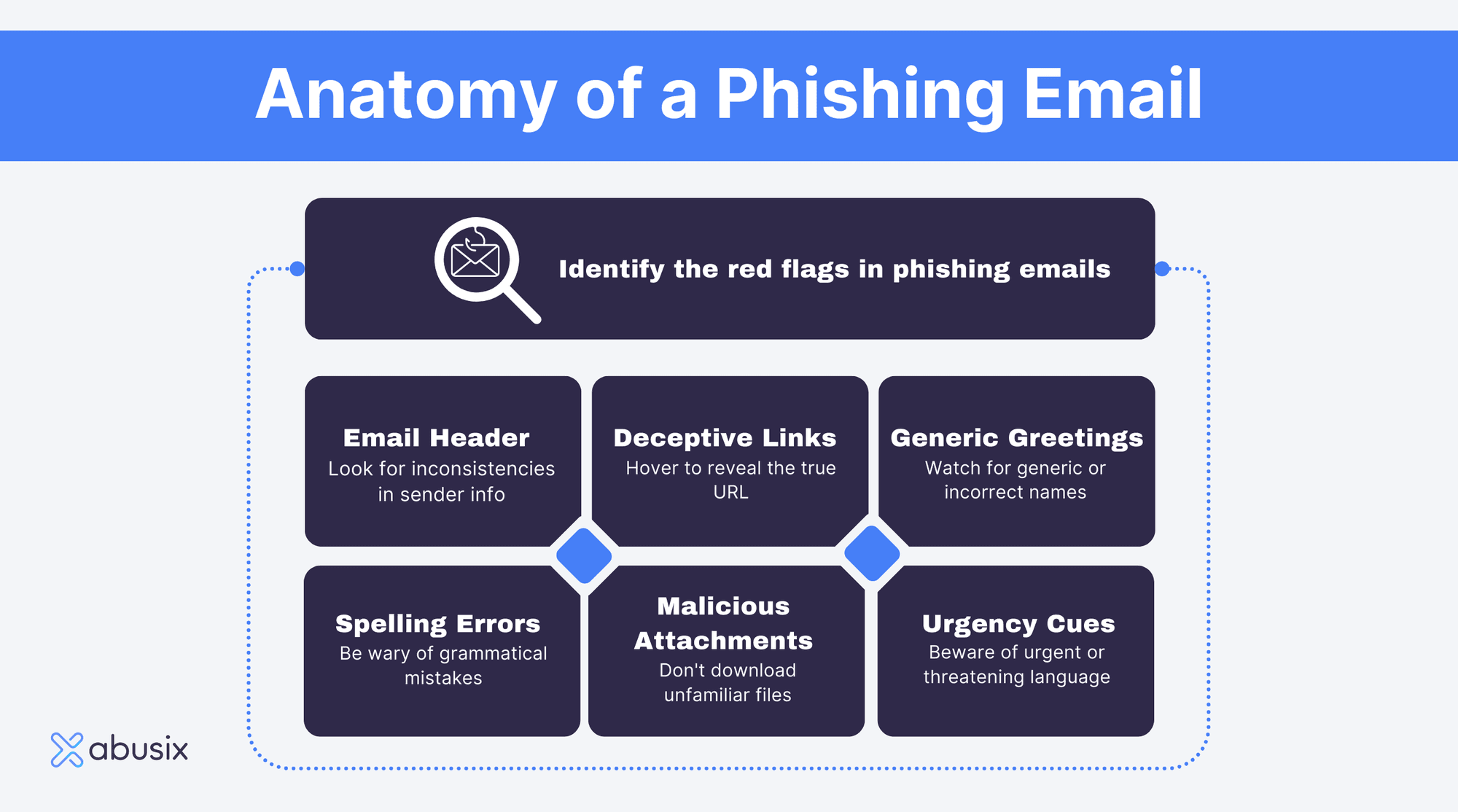
Anatomy of a phishing email showing fake headers and manipulated links
Figure 1: Anatomy of a typical phishing email—highlighting spoofed sender domains, artificial urgency, and malicious links.

The Anatomy of a Phishing Attack

While the specific themes used in phishing campaigns vary continuously, most attacks follow a standard four-stage lifecycle:

1. Crafting the Bait

The attacker designs a communication channel (such as an email, SMS, or direct message) that mimics an official notification. To maximize credibility, threat actors copy corporate branding, color palettes, footers, and official terminology. They often register domain names that visually resemble legitimate domains (a technique called typosquatting, such as paypa1.com instead of paypal.com).

2. Triggering Psychological Pressure

Phishing succeeds by short-circuiting critical thinking. Messages almost universally invoke one of three emotional triggers:

  • Urgency and Fear: “Your account will be suspended within 24 hours due to unauthorized activity.”
  • Financial Anxiety: “Unpaid delivery charge of $1.99 required to release your package.”
  • Greed or Curiosity: “Exclusive reward claim” or “Your tax refund is ready for disbursement.”

3. Redirection to a Spoofed Portal

The communication directs the recipient to click an embedded hyperlink or open an attachment. Clicking the link takes the target to a fraudulent web page designed to mirror a legitimate login portal or payment gateway.

4. Harvesting and Exploitation

When the victim enters their credentials into the fake form, the data is captured directly by the attacker’s server. In modern advanced phishing kits, the system relays credentials in real-time to the actual legitimate service, prompting the user for an MFA code which is then instantly intercepted to bypass two-factor authentication.

Conceptual illustration of cybersecurity threats and social engineering hooks
Figure 2: Digital hook vectors—how social engineering breaches corporate perimeter defenses.

Common Variants of Phishing Attacks

As security awareness has improved, phishing techniques have evolved beyond simple bulk spam emails into targeted, multi-channel operations:

Variant Vector Description
Smishing SMS / Text Messages Short messages containing malicious short-links regarding package deliveries, banking alerts, or verification notices.
Vishing Voice Calls Phone scams where attackers impersonate bank fraud departments, tax authorities, or tech support to extract sensitive details orally.
Spear Phishing Email / Messaging Apps Highly targeted attacks directed at specific individuals or organizations, customized using Open Source Intelligence (OSINT).
Whaling Email Spear phishing aimed at high-profile targets, such as C-level executives (CEOs, CFOs), to authorize high-value wire transfers.
Angler Phishing Social Media Impersonating customer support accounts on platforms like X (Twitter) or Facebook to divert unhappy customers to fraudulent support pages.

🚨 Key Red Flags to Identify Phishing Attempts

  • Discrepancies in Sender Domains: The display name says “Your Bank”, but the actual email address originates from a generic or mismatched domain (e.g., support@bank-security-update.com).
  • Generic Greetings: Use of vague terms like “Dear Customer” or “Valued Account Holder” instead of your name.
  • Hover-Link Mismatches: Hovering over a link reveals a destination URL that differs significantly from the hyperlinked text.
  • Unsolicited Attachments: Receiving unexpected .zip, .exe, or macro-enabled Office files.

How to Protect Yourself: Defense Strategies

Mitigating phishing risks requires combining technical controls with heightened personal vigilance.

Best Practices for Digital Protection:

  1. Verify the URL Address Bar: Before entering login credentials, carefully inspect the web address. Ensure exact spelling and correct domain structure.
  2. Implement Hardware-Based MFA: Use physical FIDO2/U2F security keys (such as YubiKeys) or authenticator apps rather than SMS-based verification, which can be intercepted or social-engineered.
  3. Avoid Direct Links in Alerts: If you receive a notification regarding an account suspension or payment issue, navigate independently to the service’s official app or website rather than clicking the link provided.
  4. Use a Dedicated Password Manager: Password managers automatically detect domain mismatches and will refuse to auto-fill credentials on spoofed phishing pages.
  5. Report Phishing Attempts: Forward suspicious messages to your organization’s IT security team, or report them to national cybersecurity centers (such as the CISA or Anti-Phishing Working Group).

Conclusion

Phishing remains a formidable threat due to its focus on manipulating human behavior rather than cracking software code. While spam filters and antivirus software offer significant protection, personal awareness remains the most effective defense. By recognizing red flags, verifying sender identities, and maintaining a healthy degree of skepticism, individuals and organizations can dramatically reduce their exposure to social engineering threats.

Posted on Categories Threats

What is Spyware? How Unseen Malware Threatens Your Digital Privacy

Understanding Spyware: How Invisible Surveillance Threats Work

In the modern digital landscape, data has become the world’s most valuable commodity. While cyber threats such as ransomware announce their presence loudly by locking files and demanding payments, a far more stealthy category of malware works entirely in the shadows: spyware. Designed specifically to infiltrate personal devices, record user habits, and siphon away sensitive intelligence, spyware operates under a strict rule of zero visibility. Understanding how this silent software functions is essential for maintaining personal digital security.

Defining Spyware: The Silent Observer

Spyware is a umbrella term for malicious software created to covertly gather information from a computer, smartphone, or tablet without the user’s explicit consent or knowledge. Unlike traditional viruses that aim to corrupt operating system files, or trojans meant to create system backdoors, the primary objective of spyware is unauthorized intelligence gathering.

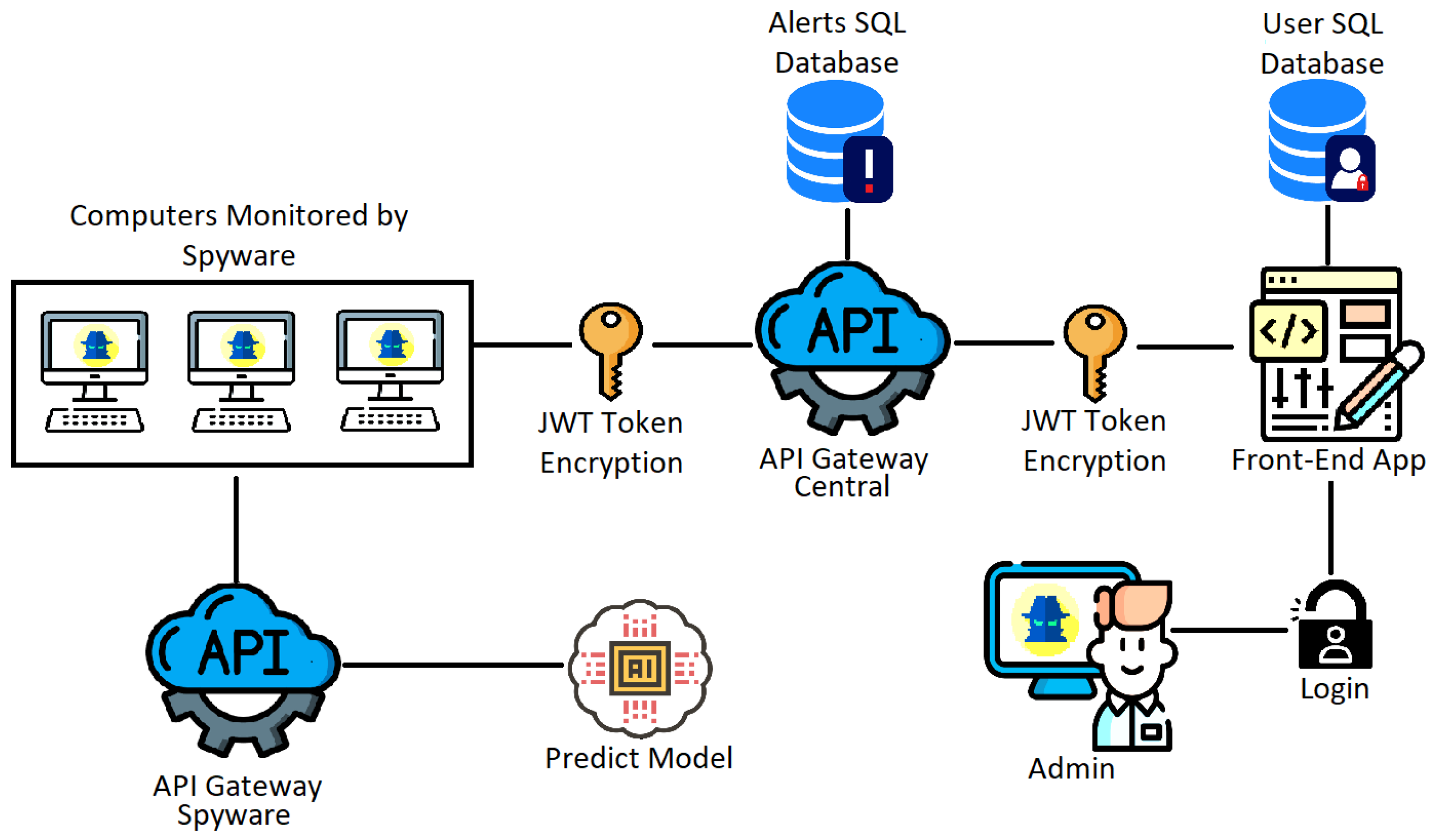
Once deployed on an endpoint, spyware runs continuously in the background, consuming minimal system resources to avoid raising suspicion. It carefully monitors user behavior, harvests stored credentials, tracks web activity, and transmits this sensitive telemetry back to remote Command and Control (C2) servers managed by cybercriminals, rogue advertisers, or unauthorized surveillance actors.

Architecture diagram of spyware monitoring endpoints and communicating with centralized API gateways
Figure 1: Typical architecture showing how spyware monitors infected endpoints and exfiltrates gathered data through secure API gateways to remote control databases.

How Spyware Operates: The Attack Lifecycle

To fully grasp how spyware compromises an endpoint, it helps to analyze its operational lifecycle. While individual variants employ different tactics, most infections follow a distinct four-stage process:

1. Infiltration and Delivery

Spyware rarely relies on forceful entry; instead, it manipulates human trust through social engineering. Common infection vectors include:

  • Phishing Email Attachments: Malicious PDF or Office documents containing hidden scripts that execute upon opening.
  • Software Bundling (“PUPs”): Potentially Unwanted Programs disguised as free utilities, PDF converters, or video players that install spyware silently alongside the main application.
  • Drive-By Downloads: Exploiting unpatched browser vulnerabilities when a user simply visits an infected or compromised website.
  • Malicious Mobile Apps: Third-party mobile application packages (APKs) that request excessive system permissions (e.g., camera, microphone, SMS read access).

2. Stealth Installation and Persistence

Once inside, spyware establishes persistence within the host operating system. It registers malicious processes to run automatically every time the device boots up. To stay hidden, it disguises executable names as critical system services (such as svchost.exe on Windows or system daemons on macOS/Linux) and suppresses any error dialogs that might alert the user.

3. Data Harvesting

With persistence established, the payload activates its data gathering modules. Depending on the software’s objective, it begins recording key inputs, scraping browser caches, capturing screen snapshots, or activating integrated peripherals like webcams and ambient microphones.

4. Exfiltration

Gathered data is encrypted and staged locally before being silently uploaded to the attacker’s server. To avoid network detection tools, exfiltration often takes place during off-peak hours or leverages standard web protocols (such as HTTPS POST requests) so the data traffic blends seamlessly with normal web traffic.

Diagram showing the stages of keylogger spyware from Trojan infection to exfiltration
Figure 2: The multi-stage progression of keylogging spyware, from initial Trojan delivery to command-and-control credential exfiltration.

Primary Categories of Spyware

Spyware is not a single, uniform tool. It encompasses various specialized malware families designed for distinct surveillance tasks:

Category Primary Function Targeted Information
Keyloggers Intercepts and logs physical hardware and virtual keyboard inputs. Passwords, credit card details, private messages, account pins.
Infostealers Scans local drives and browsers for saved data caches. Autofill data, crypto wallet keys, session cookies, system specs.
Banking Trojans Injects fake overlay forms over legitimate financial applications. Online banking credentials, two-factor authentication codes.
Adware / Tracking Cookies Tracks online browsing habits to serve invasive targeted ads. Search queries, shopping interests, demographic location markers.
Stalkerware Monitors personal smartphone communications and physical locations. GPS coordinates, phone call recordings, messaging apps (WhatsApp, SMS).

Warning Signs of a Spyware Infection

Because spyware prioritizes stealth, detecting it requires paying close attention to minor system anomalies. Common indicators include:

  • Unexplained System Sluggishness: High CPU or RAM utilization caused by background logging processes.
  • Rapid Battery Drain: Mobile devices losing power quickly due to persistent GPS tracking and cellular data transmission.
  • Browser Hijacking: Unwanted changes to your default search engine, home page, or newly installed browser toolbars.
  • Surge in Network Usage: Unexpected spikes in background data consumption, indicating active file uploading.
  • Pop-up Advertisements: Frequent, aggressive pop-ups appearing even when disconnected from active browser sessions.

Essential Defensive Strategies

Protecting your system against spyware requires a multi-layered approach combining modern software security tools with sound security practices:

  1. Keep Software Updated: Regularly install operating system and browser updates to patch security vulnerabilities exploited by spyware.
  2. Enable Multi-Factor Authentication (MFA): MFA ensures that even if a keylogger steals your password, attackers cannot access your accounts without secondary verification.
  3. Use Real-Time Antivirus/EDR Protection: Deploy reputably sourced security suites capable of behavioral monitoring to intercept unauthorized background tasks.
  4. Review Application Permissions: Regularly inspect app permissions on smartphones and revoke unnecessary access to cameras, microphones, or location services.
  5. Practice Cautious Browsing: Never download attachments from unknown senders, and avoid installing software from unofficial third-party app stores.

Conclusion

Spyware represents one of the most pervasive threats to modern digital privacy. By operating silently, it exploits user trust to systematically dismantle online confidentiality. However, by understanding the mechanics of how spyware infiltrates systems and maintaining disciplined security habits, users can effectively safeguard their devices, credentials, and personal privacy from silent online surveillance.

Posted on Categories Threats

What is Malware? The Comprehensive Guide to Threat Types and Digital Protection

🚨 Cyber Threat Intelligence Report

Malicious software changes its digital face every day. Learn how to identify modern infections, analyze attack vectors, and build a fortress around your systems.

The global digital ecosystem relies on interconnected software pipelines, cloud databases, and lightning-fast networks. While this connectivity makes life incredibly convenient, it also opens up massive opportunities for cyberattacks. The most common tool used in these attacks is **malware**. Short for “malicious software,” malware is an umbrella term used to describe any code, script, or program designed to secretly infect computers, servers, mobile devices, or network infrastructures without the owner’s explicit consent.

The era of simple, annoying desktop jokes written by curious teenagers is long gone. Modern malware has evolved into a highly professional, multi-billion-dollar global industry. Organized cybercrime syndicates, state-sponsored hacking groups, and lone actors deploy sophisticated malicious software to steal financial assets, harvest corporate secrets, monitor human behavior, and hold critical public infrastructure hostage. Understanding how these tools operate is the first step toward staying safe online.

The Core Mechanics of a Malware Infection Cycle

1. Delivery Phishing Email, Unpatched Exploit 2. Execution User runs macro, script bypasses OS 3. Persistence Modifies registry, hides in background 4. Payload Locks target files, exfiltrates credit cards

1. The Core Types of Malware Threat Variants

Malware is not uniform; different strains are built with entirely different behaviors, targets, and goals. To properly defend your digital parameters, you must know what these different threats look like:

Ransomware

Ransomware is one of the most visible and dangerous threats today. Once inside a system, it silently runs cryptographic operations to lock your most valuable documents, database partitions, and family photos behind high-grade encryption keys. When it finishes encryption, it drops a text message on your desktop demanding hard-to-trace cryptocurrency payments in exchange for the decryption tool. Advanced versions also steal your files before locking them, threatening to leak sensitive data online if you refuse to pay.

Spyware and Keyloggers

Spyware is built to be invisible. Instead of disrupting your operating system, it hides in background system workflows to silently watch what you do. Keyloggers, a specialized type of spyware, record every single keystroke you type on your physical keyboard. This lets attackers harvest bank login credentials, email passwords, and personal messages before transmitting them back to their control servers.

Trojans

Named after the legendary wooden horse of ancient Greece, a Trojan horse program relies entirely on deception. It presents itself as completely legitimate software—such as a free utility download, a game patch, or a media player update. Once you run the installer, the program drops its hidden malicious payload into your operating system, often setting up a secret backdoor that gives hackers complete remote control over your machine.

Adware and Bloatware

While less destructive than ransomware, adware severely degrades your digital experience. It forces your system browsers to load invasive pop-up ads, changes your default search engines without permission, and tracks your web browsing habits. This data is used to serve targeted advertisements or sold directly to shady tracking agencies.

2. Common Infection Vectors: How Malware Seeps Into Systems

Malware cannot infect a machine unless it finds a point of entry. Hacking groups rely on a few common methods to break through security perimeters. The primary tool remains **social engineering**, typically executed via phishing campaigns. These emails impersonate trusted brands, shipping organizations, or work colleagues, convincing you to open infected attachments (like macro-enabled spreadsheets) or click links that lead to drive-by download exploits.

Another dangerous entry point is **unpatched software vulnerabilities**. Operating systems and apps contain millions of lines of code, and developers occasionally make mistakes that leave security holes. Cybercriminals actively look for these flaws to inject malicious code directly into vulnerable systems over the network—requiring zero interaction from the victim.

Modern Endpoint Defense Layering Architecture

Your OS Signature Match Heuristic Engine Network Sandbox Threat Package

3. A Multi-Layered Defense Blueprint

Relying on a single antivirus scanner is no longer enough to protect you from modern cyber threats. True digital protection requires a **multi-layered approach** that stops attacks at different stages of the infection cycle.

  • Deploy Next-Generation Anti-Malware Tools: Legacy scanners only look for static file signatures. Modern security suites use heuristic analysis and machine learning engines to monitor application behavior in real time, letting them block completely new threats before they can execute.
  • Use a Premium, Secure VPN: A Virtual Private Network encrypts your internet traffic, preventing attackers from injecting malicious data packets when you are on unsecured public networks. Top-tier VPN networks also feature built-in threat protection layers that block malicious trackers and dangerous domains at the server level.
  • Keep All Software Updated: Enable automatic updates across your operating systems (Windows/macOS), web browsers, and core applications. Patching security vulnerabilities quickly closes the doors that network-crawling exploits rely on.
  • Practice Strict Privilege Separation: Avoid running your computer daily using an account with full administrative privileges. Use a standard user account for daily browsing tasks instead. This simple step ensures that even if malware executes, it lacks the necessary system permissions to deeply modify your registry or modify critical system areas.

Build a Defensible Digital Footprint

The threat landscape will continue to evolve as cybercriminals deploy increasingly automated tools. However, by understanding the mechanics of malware deployment, knowing the warning signs of background infections, and combining robust patch habits with advanced anti-malware security software and encrypted network layers, you can significantly reduce your risk exposure. Secure your systems, stay vigilant against social engineering tricks, and take control of your digital safety today.

Posted on Categories Threats