
In the modern digital landscape, data has become the world’s most valuable commodity. While cyber threats such as ransomware announce their presence loudly by locking files and demanding payments, a far more stealthy category of malware works entirely in the shadows: spyware. Designed specifically to infiltrate personal devices, record user habits, and siphon away sensitive intelligence, spyware operates under a strict rule of zero visibility. Understanding how this silent software functions is essential for maintaining personal digital security.
Defining Spyware: The Silent Observer
Spyware is a umbrella term for malicious software created to covertly gather information from a computer, smartphone, or tablet without the user’s explicit consent or knowledge. Unlike traditional viruses that aim to corrupt operating system files, or trojans meant to create system backdoors, the primary objective of spyware is unauthorized intelligence gathering.
Once deployed on an endpoint, spyware runs continuously in the background, consuming minimal system resources to avoid raising suspicion. It carefully monitors user behavior, harvests stored credentials, tracks web activity, and transmits this sensitive telemetry back to remote Command and Control (C2) servers managed by cybercriminals, rogue advertisers, or unauthorized surveillance actors.
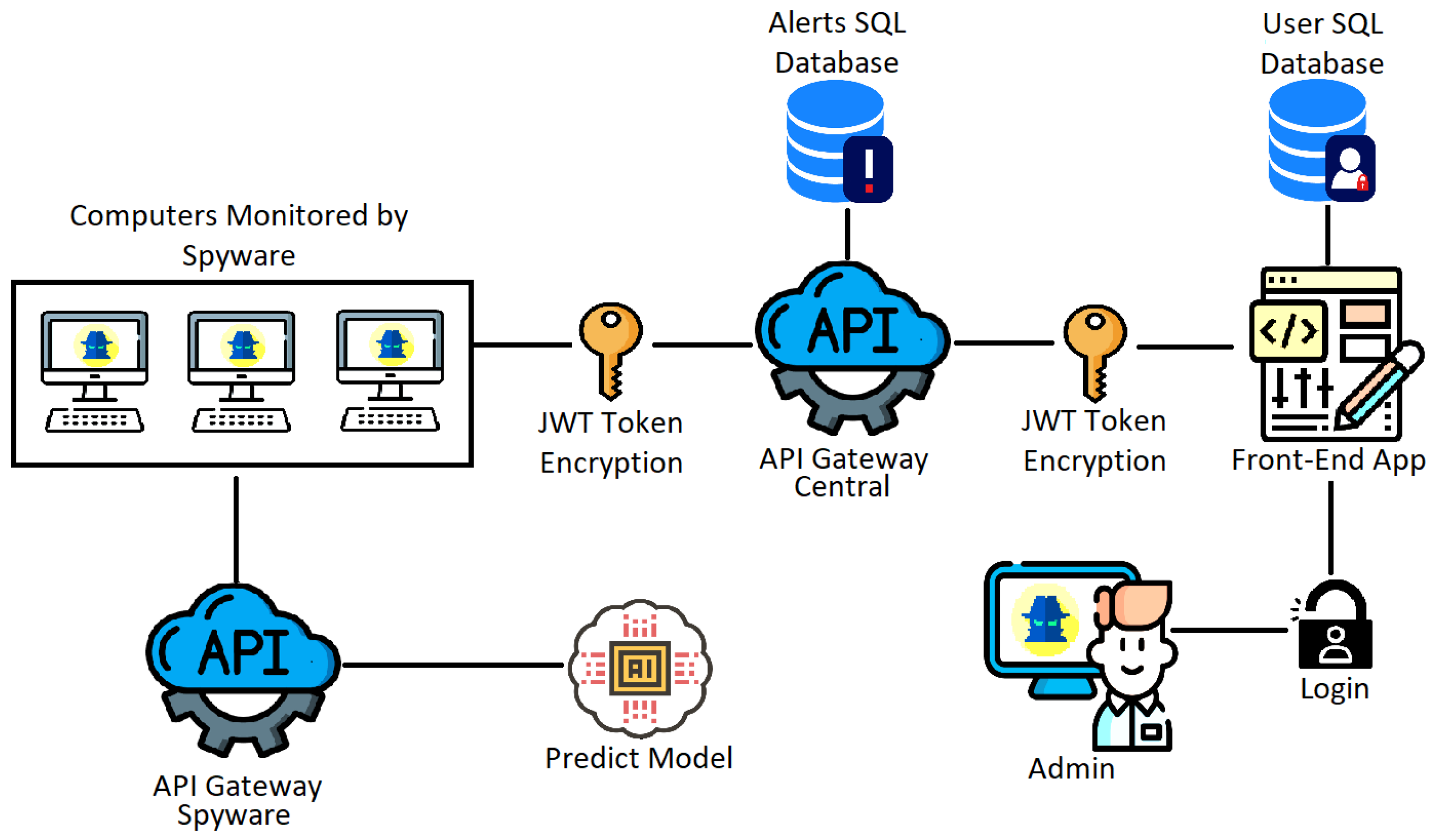
How Spyware Operates: The Attack Lifecycle
To fully grasp how spyware compromises an endpoint, it helps to analyze its operational lifecycle. While individual variants employ different tactics, most infections follow a distinct four-stage process:
1. Infiltration and Delivery
Spyware rarely relies on forceful entry; instead, it manipulates human trust through social engineering. Common infection vectors include:
- Phishing Email Attachments: Malicious PDF or Office documents containing hidden scripts that execute upon opening.
- Software Bundling (“PUPs”): Potentially Unwanted Programs disguised as free utilities, PDF converters, or video players that install spyware silently alongside the main application.
- Drive-By Downloads: Exploiting unpatched browser vulnerabilities when a user simply visits an infected or compromised website.
- Malicious Mobile Apps: Third-party mobile application packages (APKs) that request excessive system permissions (e.g., camera, microphone, SMS read access).
2. Stealth Installation and Persistence
Once inside, spyware establishes persistence within the host operating system. It registers malicious processes to run automatically every time the device boots up. To stay hidden, it disguises executable names as critical system services (such as svchost.exe on Windows or system daemons on macOS/Linux) and suppresses any error dialogs that might alert the user.
3. Data Harvesting
With persistence established, the payload activates its data gathering modules. Depending on the software’s objective, it begins recording key inputs, scraping browser caches, capturing screen snapshots, or activating integrated peripherals like webcams and ambient microphones.
4. Exfiltration
Gathered data is encrypted and staged locally before being silently uploaded to the attacker’s server. To avoid network detection tools, exfiltration often takes place during off-peak hours or leverages standard web protocols (such as HTTPS POST requests) so the data traffic blends seamlessly with normal web traffic.

Primary Categories of Spyware
Spyware is not a single, uniform tool. It encompasses various specialized malware families designed for distinct surveillance tasks:
| Category | Primary Function | Targeted Information |
|---|---|---|
| Keyloggers | Intercepts and logs physical hardware and virtual keyboard inputs. | Passwords, credit card details, private messages, account pins. |
| Infostealers | Scans local drives and browsers for saved data caches. | Autofill data, crypto wallet keys, session cookies, system specs. |
| Banking Trojans | Injects fake overlay forms over legitimate financial applications. | Online banking credentials, two-factor authentication codes. |
| Adware / Tracking Cookies | Tracks online browsing habits to serve invasive targeted ads. | Search queries, shopping interests, demographic location markers. |
| Stalkerware | Monitors personal smartphone communications and physical locations. | GPS coordinates, phone call recordings, messaging apps (WhatsApp, SMS). |
Warning Signs of a Spyware Infection
Because spyware prioritizes stealth, detecting it requires paying close attention to minor system anomalies. Common indicators include:
- Unexplained System Sluggishness: High CPU or RAM utilization caused by background logging processes.
- Rapid Battery Drain: Mobile devices losing power quickly due to persistent GPS tracking and cellular data transmission.
- Browser Hijacking: Unwanted changes to your default search engine, home page, or newly installed browser toolbars.
- Surge in Network Usage: Unexpected spikes in background data consumption, indicating active file uploading.
- Pop-up Advertisements: Frequent, aggressive pop-ups appearing even when disconnected from active browser sessions.
Essential Defensive Strategies
Protecting your system against spyware requires a multi-layered approach combining modern software security tools with sound security practices:
- Keep Software Updated: Regularly install operating system and browser updates to patch security vulnerabilities exploited by spyware.
- Enable Multi-Factor Authentication (MFA): MFA ensures that even if a keylogger steals your password, attackers cannot access your accounts without secondary verification.
- Use Real-Time Antivirus/EDR Protection: Deploy reputably sourced security suites capable of behavioral monitoring to intercept unauthorized background tasks.
- Review Application Permissions: Regularly inspect app permissions on smartphones and revoke unnecessary access to cameras, microphones, or location services.
- Practice Cautious Browsing: Never download attachments from unknown senders, and avoid installing software from unofficial third-party app stores.
Conclusion
Spyware represents one of the most pervasive threats to modern digital privacy. By operating silently, it exploits user trust to systematically dismantle online confidentiality. However, by understanding the mechanics of how spyware infiltrates systems and maintaining disciplined security habits, users can effectively safeguard their devices, credentials, and personal privacy from silent online surveillance.